


WhatsTraker
4.1101.00 Reviews
App Specs
- Version
- 6.4.0
- Updated On
- License
- Free
- Downloads
- 100,000+
- Developer
- Avatar Solutions SRL
- Categories
- Parenting
- Platform
- Android
Screenshots
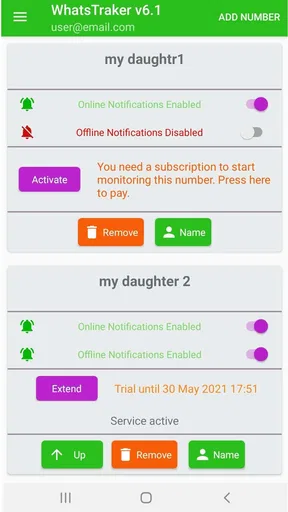
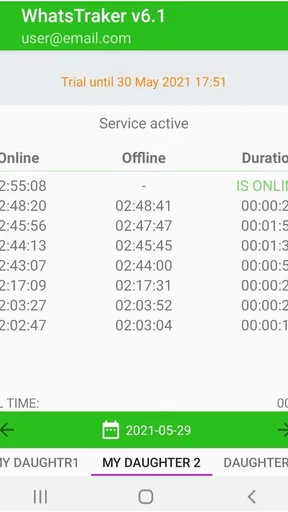
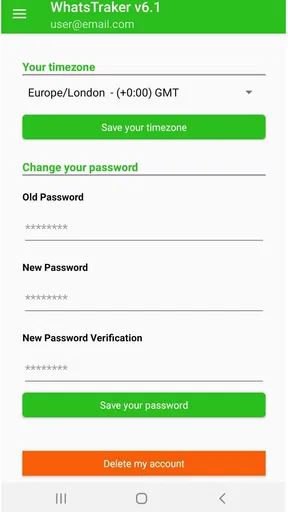
 Analysis by AppCompare
In a household where people coordinate around one shared phone or help a family member manage their messaging, it is easy to wonder who is checking WhatsApp and what a tracking app can actually tell you. WhatsTraker is aimed at that curiosity, but I would treat it as a narrow activity-checking tool, not as a family safety system. That distinction matters: it may prompt a conversation about online habits, but it cannot replace clear agreements about device use.
A shared phone changes what “checking activity” means
On a device used by more than one person, any activity view can be difficult to interpret. A notification that someone is online does not, by itself, explain who is holding the phone, why they opened WhatsApp, or whether they are available to reply. I would avoid using a status alert as proof of a person’s intentions, especially in a busy household where phones get passed around.
A more useful approach is to agree on the purpose before installing an app like this. For example, a parent and teenager might discuss whether online and offline updates are meant to help with practical coordination, or whether they would feel intrusive. If the goal is simply to know whether someone has seen a message, asking them directly or agreeing on a check-in routine may be clearer and less likely to create tension.
Keep account boundaries clear from the start
WhatsTraker’s basic idea concerns WhatsApp activity, so I would think carefully about which account and device are involved before making it part of a shared routine. If several people can access one phone, make sure everyone understands whose account is being observed and who will see the resulting information. A shared household device should not quietly turn into a way to monitor one person without their knowledge.
I also recommend checking the app’s current permission prompts and privacy information yourself during setup. Permissions are a practical boundary, not just a box to tap through: grant only what you understand and are comfortable with. If the explanation feels unclear, pause rather than proceeding on the assumption that every permission is automatically necessary.
One useful habit is to review the app’s notifications and the phone’s own notification settings after setup. Alerts can be disruptive if they arrive during school, work, or family time. Choosing a sensible notification arrangement helps keep the tool from becoming a constant source of interruption, while still letting it serve its intended purpose.
Use alerts for coordination, not as a substitute for a conversation
The online-or-offline notification concept can be handy when a family is trying to coordinate a quick message, but presence is not the same thing as availability. Someone may open WhatsApp briefly, be in the middle of another task, or simply not be ready to respond. I would treat a notification as a small clue, not a demand for an immediate reply.
Worth Reading Before You Choose

Flipboard Shows What News Apps Must Do Beyond the Feed

Switching to Android Auto Means Rethinking Your Driving Routine

Google Calendar Makes a Crowded Week Easier to Manage

Ludo King Makes the Most of the Minutes Between Plans

Baby Panda World Brings Quick Play to Modern Phones, but Its Game Library Feels Busy

ESPN’s Live Game View Makes Following Close Games Easier
Consider an everyday situation: a parent is arranging pickup and wants to know whether a teenager may be able to see a message. An alert might help them decide whether to send a follow-up through an agreed channel, but it cannot confirm that the message was read or that the teenager is free to answer. A simple household rule such as “reply when you can, and call if the plan changes” is more dependable than drawing conclusions from online status alone.
This is also where WhatsTraker differs from familiar parental-control or family-location tools. Those are generally chosen for broader supervision or location-related coordination, while this app’s appeal is much more specific: awareness of WhatsApp activity. If you need location sharing, screen-time schedules, or device-level controls, choose a tool designed for that job instead of expecting this one to provide those functions.
Age, trust, and the limits of monitoring
The app is marked for Everyone, which describes its content classification; it does not settle whether monitoring is appropriate for every age or family situation. With younger children, a parent may manage a device more directly, while an older child or teenager is more likely to benefit from an honest explanation and a say in how the app is used. I see transparency as essential if the aim is safety rather than surveillance.
There is a real trade-off here. Activity visibility can make coordination feel easier, but frequent checking may encourage adults to interpret ordinary delays as problems. It can also make a young person feel watched even when no immediate concern exists. If trust is already strained, a direct discussion about messaging expectations is often a better first step than adding another monitoring layer.
For adults sharing a device, the same principle applies. Make sure the person whose WhatsApp activity is involved knows what the app is being used for. A household arrangement works best when everyone understands the boundary: what is being checked, who can see it, and what the information will—and will not—be used to decide.
Who is likely to find it useful?
I can see a fit for someone who wants a focused way to keep an eye on WhatsApp online and offline activity, especially when that information supports an agreed routine. It may also suit a household that already communicates openly about device use and wants a narrow coordination aid rather than a large suite of controls.
I would skip it if you expect a complete parental-control setup, proof of what someone is doing, or a reliable measure of whether they are ready to talk. It is also a poor match for anyone uncomfortable with monitoring another person’s messaging activity. In those cases, a direct check-in, WhatsApp’s own communication features, or a purpose-built family tool may be a more appropriate choice.
Before relying on any activity tracker, decide what action you will take when an alert appears. If there is no practical next step beyond repeatedly checking, the notifications may add anxiety without improving coordination. That small decision can help you tell whether the app is genuinely useful in your home or merely makes status watching easier.
First Impressions
When I first stumbled upon WhatsTraker, I was intrigued by its promise to track profile visitors. I mean, who wouldn't want to know who's been lurking around their WhatsApp profile? So, I downloaded it on my Android device and gave it a whirl.
Getting Started
Setting up WhatsTraker was a breeze. The app has a straightforward installation process with clear instructions. Once installed, I was greeted with a clean and intuitive interface. The app doesn’t bombard you with unnecessary features, sticking to its core promise of tracking profile visitors.
After granting the necessary permissions, which the app clearly explains, I was all set. The dashboard is user-friendly, with tabs that are easy to navigate. Within minutes, I was exploring who might be interested in my WhatsApp profile. Exciting, right?
Features and Functionality
The primary feature of WhatsTraker is its ability to show you who has viewed your WhatsApp profile. It does this by analyzing your WhatsApp activity and providing a list of visitors. I found this feature to be quite fascinating, even if a bit eerie at times!
Another interesting feature is the ability to see who viewed your status. This can be particularly useful for those who regularly post updates and want to know who’s keeping tabs on them. The app also provides a list of people who are "interested" in your WhatsApp activities, which adds an extra layer of intrigue.
User Experience
One of the standout aspects of WhatsTraker has to be its user experience. The app is designed to be lightweight and efficient. I didn’t experience any lag or crashes, which is a huge plus. The developers seem to have focused on creating a seamless experience, allowing users to get the information they need without any hassle.
The app’s design is minimalistic, which I appreciate. Sometimes less is more, and in this case, it works perfectly. The information is presented clearly, and I didn’t find myself confused at any point while using it.
Security and Privacy
Now, let’s talk about something that’s on everyone’s mind: privacy. With apps like this, there’s always a concern about data safety. WhatsTraker assures users that it doesn’t store personal data or misuse any information. The app requires certain permissions to function, but it’s upfront about its privacy policy. As someone who values privacy, this was reassuring.
Final Thoughts
After using WhatsTraker for a while, I can see its appeal. It’s a nifty tool for those curious about their WhatsApp interactions. While it might not be for everyone, particularly those who aren’t concerned with who’s viewing their profile, it provides an interesting perspective on social dynamics.
If you’re someone who loves staying in the know or just wants a little peek into who's checking you out on WhatsApp, WhatsTraker is worth exploring. Just remember to use it responsibly and keep your privacy settings in check.
What to consider before installing
WhatsTraker is a free parenting app from Avatar Solutions SRL. It has an average rating of 4.1 from around 27,000 ratings, with over 100,000 installs. It is marked for Everyone, and its current version is 6.4.0. It was released on September 16, 2023, and works on Android 5.0 and later. Those details make it easy to judge whether your device and comfort level are a fit, but the more important decision is whether activity monitoring matches your household’s expectations.
Because the app’s appeal depends on interpreting activity, I would avoid treating its output as a definitive record of someone’s behavior. Use it as a prompt for a practical conversation, not as evidence in an argument. That is particularly important when more than one person may handle a device or when a child’s messaging habits are being discussed.
My household verdict is straightforward: this is a specific tool for people who understand what they want to observe and have agreed boundaries around doing so. It is not a substitute for parental controls, a messaging plan, or trust between family members. If a narrow WhatsApp activity signal would genuinely help with coordination, it may be worth trying; if you need broader oversight or would rather avoid monitoring, a direct conversation or another kind of family tool is the better choice.
Pros
- Easy to use interface for beginners.
- Provides detailed insights on profile visits.
- Real-time notifications for updates.
- Lightweight app with minimal storage use.
- User-friendly design with intuitive navigation.
Cons
- Requires permissions that may raise privacy concerns.
- Free version includes intrusive ads.
- Limited features without premium version.
- Occasional bugs may cause app crashes.
- Some features require constant internet connection.
FAQs for WhatsTraker
What is WhatsTraker and how does it work?
WhatsTraker is an application designed to monitor online activity on WhatsApp. It provides insights into when a user was last active and how long they were online. The app collects data by tracking the online status of selected contacts, enabling users to understand usage patterns effectively.
Is WhatsTraker safe to use on my device?
WhatsTraker is designed with user privacy in mind, but it's essential to download it from a reputable source to avoid malware. The app requires certain permissions to function, so ensure you're comfortable with these before proceeding. Always check reviews and do your research to ensure the app’s safety.
Do I need to pay to use WhatsTraker?
WhatsTraker typically offers both free and premium versions. The free version may have limited features or ads, while the premium version provides a more comprehensive experience without interruptions. Users often opt for the premium version for enhanced features and detailed tracking capabilities.
Can WhatsTraker be used to track anyone's WhatsApp activity?
WhatsTraker can only track users whose numbers you add to the app. It is crucial to respect privacy and use the application ethically, ensuring you have the consent of the person you are tracking. Misuse of tracking apps can lead to ethical and legal issues.
What devices and operating systems support WhatsTraker?
WhatsTraker is available for both Android and iOS devices. Ensure your device meets the app's minimum system requirements for optimal performance. Regular updates from the developers help maintain compatibility with the latest versions of operating systems, improving user experience and functionality.


